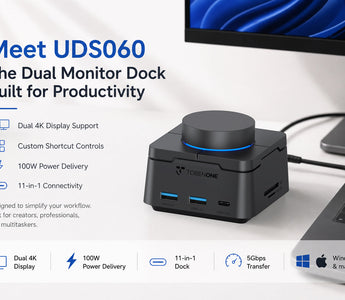
Meet UDS060: The Dual Monitor Dock Built for Productivity
Most docking stations are designed to solve a simple problem: adding more ports.
They provide extra HDMI outputs, USB connections, and charging capabilities to help users connect multiple devices.
But modern workspaces require more than connectivity alone.
Today's professionals work across multiple monitors, applications, meetings, creative tools, and communication platforms. The challenge is no longer connecting devices—it's managing workflows efficiently.
That's where the TOBENONE UDS060 stands apart.
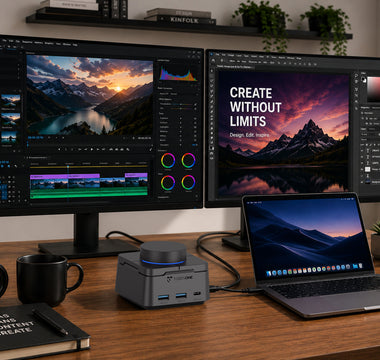
Combining dual-monitor connectivity with customizable shortcut controls, the UDS060 is designed to help users stay focused, reduce repetitive actions, and work more efficiently throughout the day.
More Than a Dual Monitor Dock
At first glance, the UDS060 offers the essential features users expect from a modern docking station:
-
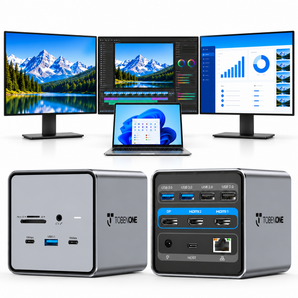
Dual 4K display support
-
100W Power Delivery charging
-
11-in-1 connectivity
-
5Gbps high-speed data transfer
-
Windows and macOS compatibility
However, the real difference lies in how users interact with their workspace.
Rather than constantly switching windows, navigating menus, or repeating the same actions every day, the UDS060 provides customizable controls that help streamline common tasks.

Built Around the Way You Work
Most productivity tools require users to adapt to a predefined workflow.
The UDS060 works differently.
Its customizable shortcut control system allows users to create actions tailored to their own habits and routines.
Whether it's launching applications, opening frequently used websites, controlling media playback, taking screenshots, locking the screen, or adjusting volume, important functions remain only a button press away.
By reducing interruptions and minimizing repetitive actions, users can maintain focus and complete tasks more efficiently.

Designed for Creators, Professionals, and Multitaskers
Content Creators
Manage editing software, media assets, communication tools, and browser windows across multiple displays while keeping workflow shortcuts within easy reach.
Remote Professionals
Handle meetings, spreadsheets, project management platforms, and documents more efficiently without constantly switching between applications.
Designers and Developers
Keep creative software, development tools, references, and communication platforms organized while maintaining quick access to frequently used commands.

Why Productivity Matters More Than Ports
Adding more ports is useful.
Adding more control is transformative.
While dual monitors improve visibility and docking stations improve connectivity, the UDS060 helps users improve how they interact with their entire workspace.
This combination of connectivity and workflow control creates a cleaner, faster, and more productive desktop experience.

Final Thoughts
A productive workspace isn't defined by how many devices are connected.
It's defined by how efficiently those devices work together.
The TOBENONE UDS060 combines dual-monitor support, customizable shortcut controls, 100W Power Delivery charging, and versatile 11-in-1 connectivity into a single productivity-focused dock.
For professionals looking to simplify their setup while gaining more control over their daily workflow, the UDS060 offers a smarter way to work.
FAQ
What makes the UDS060 different from other docking stations?
Unlike traditional docking stations that focus primarily on connectivity, the UDS060 combines dual-monitor support with customizable shortcut controls designed to improve workflow efficiency.
Can I customize the shortcut controls on the UDS060?
Yes. Through the companion software, users can assign custom actions such as launching applications, controlling media, taking screenshots, opening websites, and more.
Does the UDS060 support dual monitors?
Yes. The UDS060 supports dual-monitor configurations for compatible Windows and macOS devices.
Can the UDS060 charge my laptop?
Yes. The dock supports up to 100W Power Delivery charging through a compatible USB-C connection.
Recommended Product
Ready to simplify your workflow?
The TOBENONE UDS060 combines dual-monitor support, customizable shortcut controls, 100W charging, and versatile connectivity in one compact productivity dock.
👉 Explore the TOBENONE UDS060 Docking Station